Convert whole folders to WebP
WebP is the format the web settled on: a third smaller than JPEG, transparency without PNG weight, supported by every browser since 2020. Kovert converts a folder in one pass, on your machine.
v0.1.0 · Windows 10 and later · macOS on Apple Silicon · free for personal use
One preset does it
Drop the folder
Or the zip an export gave you. Kovert lists archives without unpacking them first, however large they are.
Pick Web images
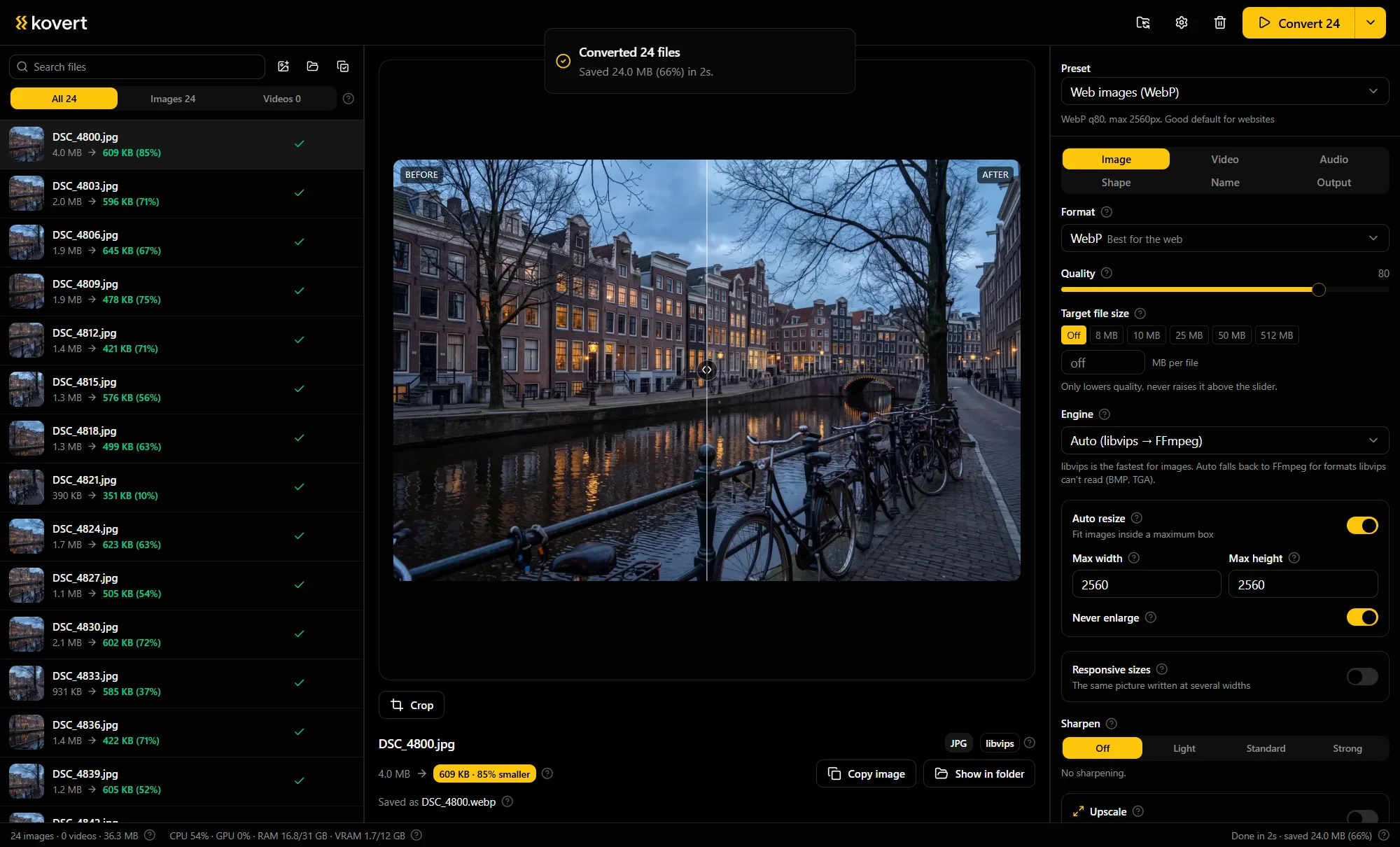
The default preset: WebP at quality 80, the long edge capped at 2560 px, metadata stripped. Change any of it and save the result as your own preset.
Convert
A measured run: 24 photos, 36.3 MB in, 12.3 MB out, 2 seconds on a desktop Ryzen. Each row shows what that file saved.
What quality 80 actually means
For photos, quality 80 is the point where the artefacts stop being findable at normal zoom. The measured sample on our landing page went from a 4.0 MB JPEG to a 609 KB WebP that way.
Hard-edged graphics are different: sharp lines show artefacts first, so compress them gently or leave logos in PNG.
Transparency and animation survive
A PNG with transparency becomes a WebP with transparency, at a fraction of the weight.
An animated GIF can come back as an animated WebP, which is routinely a tenth of the size.
The srcset comes free
Web work rarely needs one width. Kovert writes the extra widths in the same run and hands you the finished srcset line, on the clipboard or as srcset.txt next to the files.
Add the AI renamer and the files arrive named for what is in them before they touch the CMS.
Questions
- WebP or AVIF?
- AVIF is smaller at the same quality and slower to write. If your pipeline and your visitors handle it, take AVIF, Kovert writes both. WebP is the safer default.
- Does anything still not open WebP?
- Old design tools and some office software balk at it. For files that leave the web, JPG remains the diplomatic choice.
- Can it convert back to JPG?
- Yes. The WebP to JPG page covers that direction.
- What happens to the EXIF?
- The web preset strips metadata, which is what a public site wants. Switch to keep, or to keep without the GPS position, when you need it.
- What does it cost?
- Free for your own files at home. Converting for a company site is work, which is one €49 seat, one time.
Related
- WebP to JPG
The other direction, for when a WebP needs to be an ordinary JPG.
- AVIF converter
The next format down the same road.
- AI photo renamer
Product photos named for what they show, in the same run.
Point it at a folder and see what comes back.
v0.1.0 · Windows 10 and later · macOS on Apple Silicon